 The well-known PSU manufacturer FSP has voiced the launch of retailing of its latest modular Dagger line power units, being announced during the Computex event. The specialties are of 500 and 600 W nominal capacity, made in the SFX form-factor and are 80 Plus Gold certified (88% efficiency at 230 V). These are good-quality solutions, which do not take much room. Producers claim, they are perfect for micro-ATX or mini-ITX gaming systems.
The FSP SDA500 and SDA600 Dagger products give out 100% of power at 12V circuit, which means 41.6 А and 50 А respectively. The devices are overvoltage, overheat, overpower and short circuit protected, equipped with a power factor active correction mechanism and support SFX12V V3.3 and ATX12V V2.4 standards. Proper cooling is ensured by a low-noise 80 mm double ball bearing fan.
Presently the FSP Dagger SDA500 and SDA600 power supplies are officially on sale at the recommended price of $99 and $109. The company-issued warranty is 5 years.
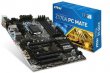 MSI has recently habituated to launching ever newer and more efficient mainboards. This time the company unveils Z170A PC Mate full ATX model that draws power via 24-pin ATX and 8-pin EPS sockets. It is based on Intel Z170 chipset and is estimated for Intel Core LGA1151 (Skylake) CPUs. The core cooperates closely with DDR4 3300 MHz memory (4 slots are available, two-channel mode), the maximal volume of which might achieve 64 GB.
 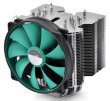 Deepcool is globally known primarily by the products targeting budget-oriented and mid-level customers. Nonetheless, currently the company strides towards enthusiast-level segment, offering more powerful, more efficient, and more sophisticated devices. CPU cooler with a biblical name Lucifer is a bright example of many-years’ expertise in PC cooling market. It differentiates itself by a solid performance on heat dissipation combined with an alluring price. Let’s take a closer look at the model.
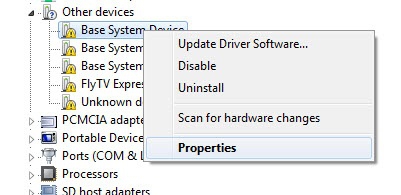 2. Open-install unit -> Details tab
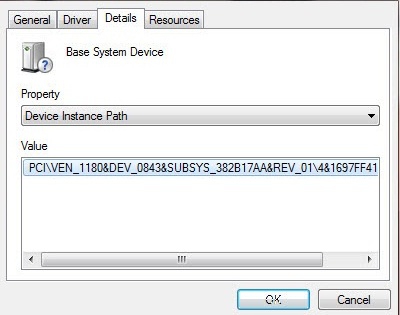 3. Copy the code instance of the device, or press Crtl-C
4. Paste the code found an instance of the device in the search bar "Enter Device Id", or press Crtl-V
5. Click the "Search"
The search result will be a reference to the driver
6. Download the desired (or iterate through the list)
3. Copy the code instance of the device, or press Crtl-C
4. Paste the code found an instance of the device in the search bar "Enter Device Id", or press Crtl-V
5. Click the "Search"
The search result will be a reference to the driver
6. Download the desired (or iterate through the list)