 The Thermalright company has commercialized the ARO-M14 cooling system, designed for AMD Ryzen processors. The novelty got the shape of a standard tower cooler. It’s available in two versions differing in colour of the upper plate of a heatsink. The manufacturer claims, its product is able to disseminate up to 240 W of heat output.
The Thermalright ARO-M14 heatsink with the 140 x 115 x 162 mm dimensions weighs 720 g. The system features the copper nickel-plated base, six copper heat pipes (6 mm in diameter) and an array of aluminium fins.
The supply kit contains a 140 mm TY-147 fan, operating at the 300–1,300 rpm velocity. The propeller produces up to 73.6 CFM (125 m³/h) airflow at the ultimate 21 dBA noise level. The list of processing platforms supported includes AMD AM4 only.
One may purchase Thermalright ARO-M14 in many European stores for about €50.
 The much-talked about graphical technology from AMD – FreeSync – is already out. Its privileges over rival solutions might be seen from different angles. To begin with, it dramatically optimizes the gameplay by improving image smoothness, reducing lag time, and eliminating splitting. FreeSync enables the synchronization of screen refresh time with GPU refresh time in real time; hence, images are updated only when the graphical adapter shapes the frame.
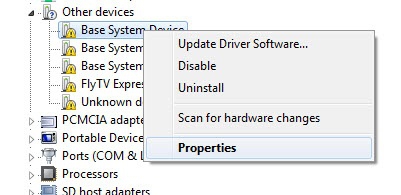 2. Open-install unit -> Details tab
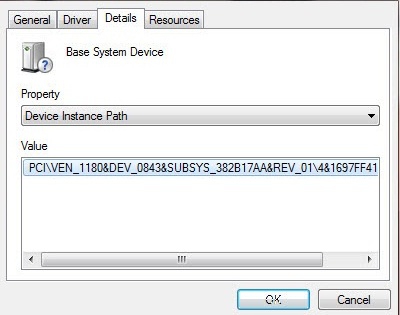 3. Copy the code instance of the device, or press Crtl-C
4. Paste the code found an instance of the device in the search bar "Enter Device Id", or press Crtl-V
5. Click the "Search"
The search result will be a reference to the driver
6. Download the desired (or iterate through the list)
3. Copy the code instance of the device, or press Crtl-C
4. Paste the code found an instance of the device in the search bar "Enter Device Id", or press Crtl-V
5. Click the "Search"
The search result will be a reference to the driver
6. Download the desired (or iterate through the list)